Writing Less Liquid Code in 2026: Shopify Features That Replace Old Workarounds

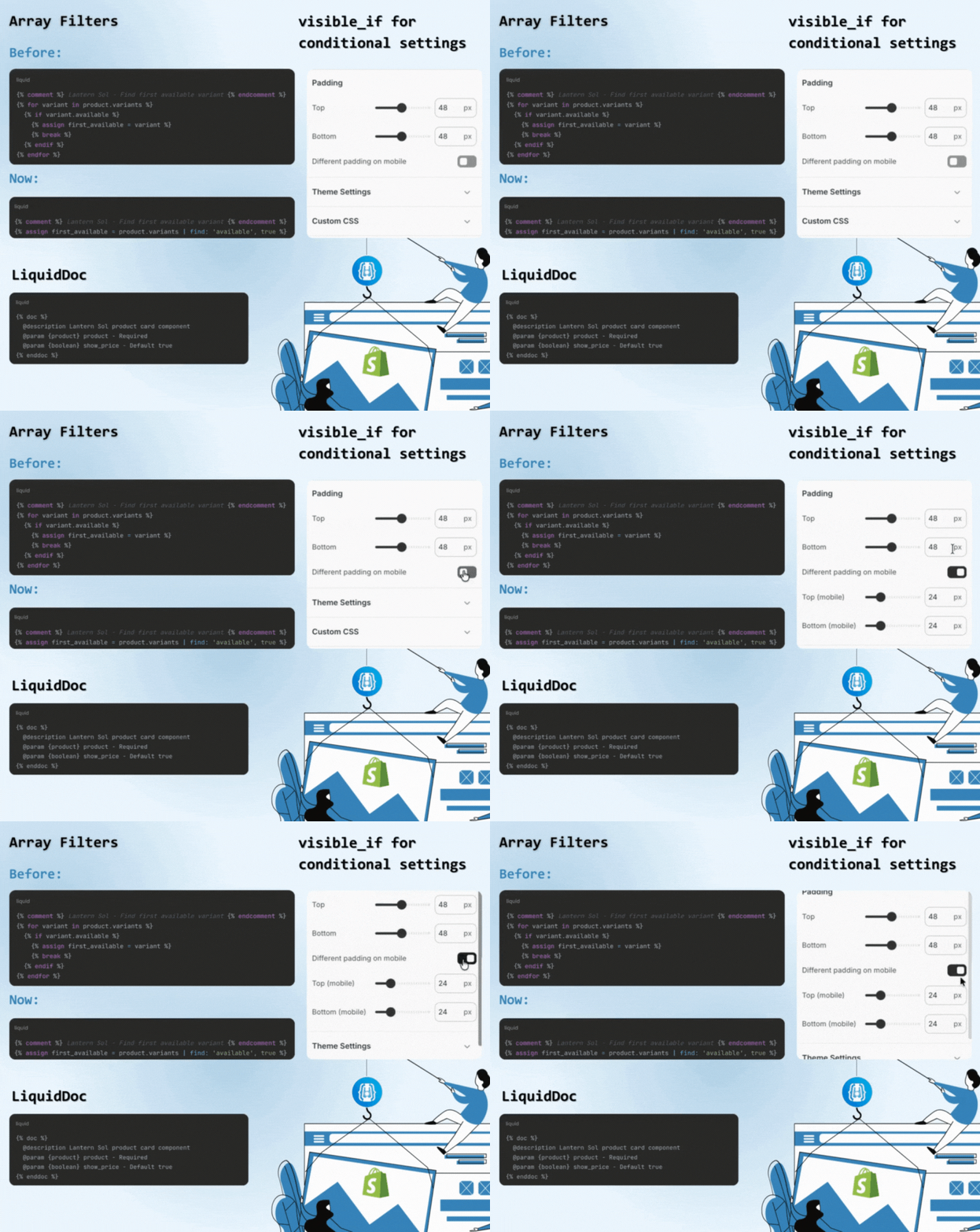
Shopify Theme Development has changed significantly in the past few years. What once required custom loops, defensive conditionals, and layered snippet logic can now be handled by native platform features. Yet many themes still rely on legacy patterns that increase complexity without adding value.Writing less Liquid code in 2026 is not about limiting customization. It is about using modern Shopify capabilities to replace outdated workarounds. Features like array filters, visible_if, and LiquidDoc allow developers to simplify templates, reduce repetition, and build themes that are easier to maintain over time.The shift is architectural. Cleaner Liquid code improves readability, lowers maintenance overhead, and supports long-term scalability. In modern Shopify Theme Development, disciplined simplification is no longer optional. It is a best practice.
Key takeaways
- Many legacy Liquid workarounds are no longer necessary.
- New array filters eliminate verbose loops.
- visible_if removes conditional settings hacks.
- LiquidDoc reduces undocumented snippet complexity.
- Modern Shopify Theme Development prioritizes cleaner Liquid code over clever logic.
What is a Shopify Theme Development?
Shopify Theme Development is the process of building and customizing the front-end architecture of a Shopify store using Liquid, HTML, CSS, and JavaScript. It involves structuring templates, sections, and JSON files to control how products, collections, and content are rendered. Modern Shopify Theme Development focuses on clean Liquid code, modular sections, performance optimization, and scalable architecture so stores remain fast, maintainable, and easy to update as they grow.
Why “Less Liquid” Is the Goal in 2026
Older Shopify themes often relied on long loops, nested conditionals, and defensive logic to compensate for platform limitations.
That approach created:
- Harder-to-read templates
- Repeated logic across snippets
- Higher maintenance costs
- Greater risk of edge-case bugs
Shopify has since introduced features that replace many of those patterns. The result is not reduced capability. It is reduced complexity. Writing less Liquid code today means relying on native platform features instead of recreating them manually.
How to learn shopify theme development
What do you need to know before you start? Learning Shopify Theme Development starts with understanding how Liquid, Shopify’s templating language, controls storefront rendering. Begin by studying the structure of a modern Online Store 2.0 theme, including JSON templates, sections, and schema settings. Practice building small components locally using Shopify CLI so you can test changes safely.
Use Theme Check to reinforce Shopify theme best practices and improve code quality as you learn. Focus on writing clean Liquid code rather than complex logic, and review well-structured open-source themes to understand scalable architecture patterns.
1. Array Filters Replace Manual Variant Loops
Finding a matching object inside an array used to require a loop and conditional break.
Before
This pattern appears in many legacy themes.
Now
{% assign first_available = product.variants | find: 'available', true %}
New array filters such as find, find_index, has, and reject replace multi-line loops with single, readable statements.
Why This Replaces a Workaround
The loop was never the goal. It was a workaround for missing filtering tools.
Now:
- Logic is declarative instead of procedural.
- Templates are shorter and easier to scan.
- Fewer nested blocks reduce potential errors.
From a Shopify theme best practices perspective, this directly supports clean Liquid code and long-term maintainability.
2. visible_if Eliminates Conditional Schema Workarounds
Theme settings previously required Liquid conditionals inside templates to manage when certain configuration options applied.
Merchants often saw irrelevant fields. Developers added defensive logic to compensate.
Now, Shopify supports visible_if inside section schema.
Example
{
"type": "image_picker",
"id": "bg_image",
"label": "Background image",
"visible_if": "{{ section.settings.media_type == 'image' }}"
}
This hides the setting unless the condition is met.
Why This Replaces a Workaround
Previously:
- Developers added conditionals in the template layer.
- Extra checks were needed to avoid rendering empty values.
- Settings panels became cluttered.
Now:
- Logic moves into schema.
- Template files stay simpler.
- Merchant experience improves without additional Liquid checks.
Less defensive code. Fewer template conditionals. Cleaner architecture.
3. LiquidDoc Replaces Informal Snippet Documentation
Large themes often contain reusable snippets with undocumented parameters.
Developers relied on:
- Comments scattered in files
- External documentation
- Trial-and-error usage
LiquidDoc introduces structured documentation inside Liquid files.
Example
{% doc %}
@description Product card component
@param {product} product - Required
@param {boolean} show_price - Default true
{% enddoc %}
Why This Replaces a Workaround
Previously, teams created informal documentation systems. They were inconsistent and easy to ignore.
LiquidDoc provides:
- Structured documentation
- Parameter validation warnings
- IDE autocomplete support
That reduces misuse and eliminates the need for extra conditional safeguards in snippets. Documentation becomes part of the codebase, not an external dependency.
How Shopify CLI and Theme Check Support Cleaner Liquid
Writing less Liquid code also depends on development workflow.
Shopify CLI
Encourages:
- Local development
- Version control
- Structured deployments
This reduces rushed production edits that often introduce unnecessary logic.
Theme Check
It helps enforce:
- Clean Liquid patterns
- Deprecated syntax warnings
- Performance best practices
Together, these tools reinforce Shopify theme best practices and prevent legacy workarounds from reappearing.
Web Development services focus on clean Liquid code, modern architecture patterns, and structured workflows that reduce complexity before it becomes technical debt.
Is your Shopify theme built on legacy workarounds?
We build and refactor Shopify themes using modern architecture patterns that reduce complexity and scale with your store.
Explore web development services